Anyone who has worked on transmission line design or tendering knows the routine. You get a staking table with hundreds of towers, and someone has to turn it into a total tower weight, a count of each tower type, and a materials list. Done by hand, that takes a long time and is easy to get wrong. In this post, we’re sharing an Excel template that does the whole job automatically.
Please read before using: The weights in this template are sample values. They are random and not correct for any real project, so you must enter the correct weights from your own project. The template also calculates correctly only if the tower names in your staking table are exactly the same as the names used in the template. More details are in the “Important” section below.
What Is a Staking Table?
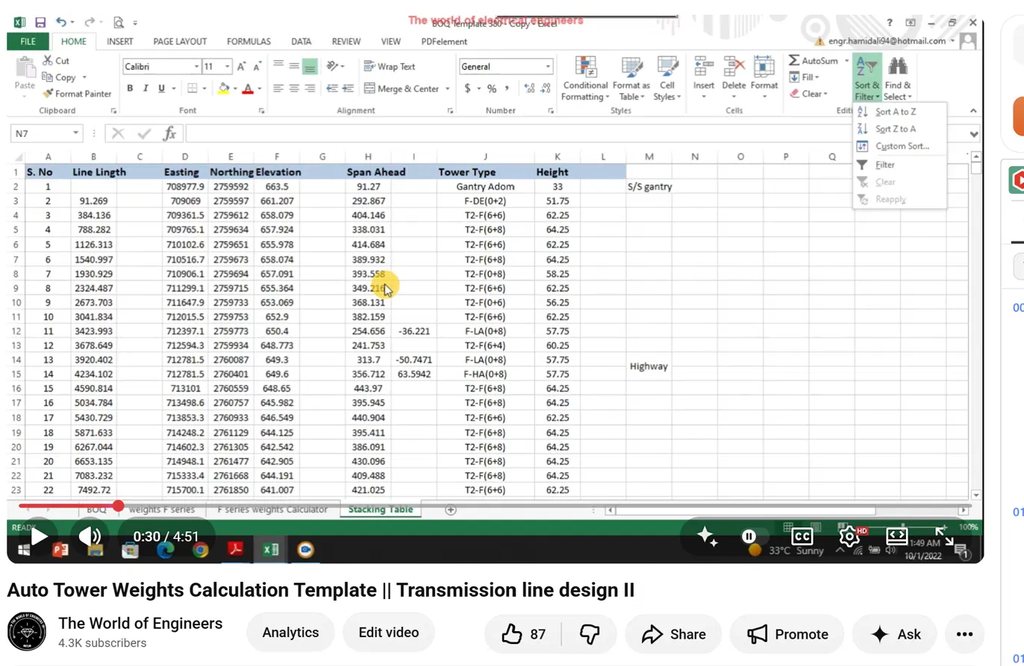
A staking table is the schedule that lists every tower along a transmission line route. Normally it is generated from PLS-CADD Software directly by Lead design Engineer. In our example it includes:
- Tower type (for example F-DE, T2-F(6+6), F-LA, F-HA, F-AN)
- Tower height
- Span ahead, the distance from one tower to the next. For example, the span from the gantry to the first dead end tower is 91.27 m, and from that dead end to the next tower it is 292.867 m.
- Easting, northing, and elevation of each tower location
- Angle of deflection at the angle towers
What the Template Needs
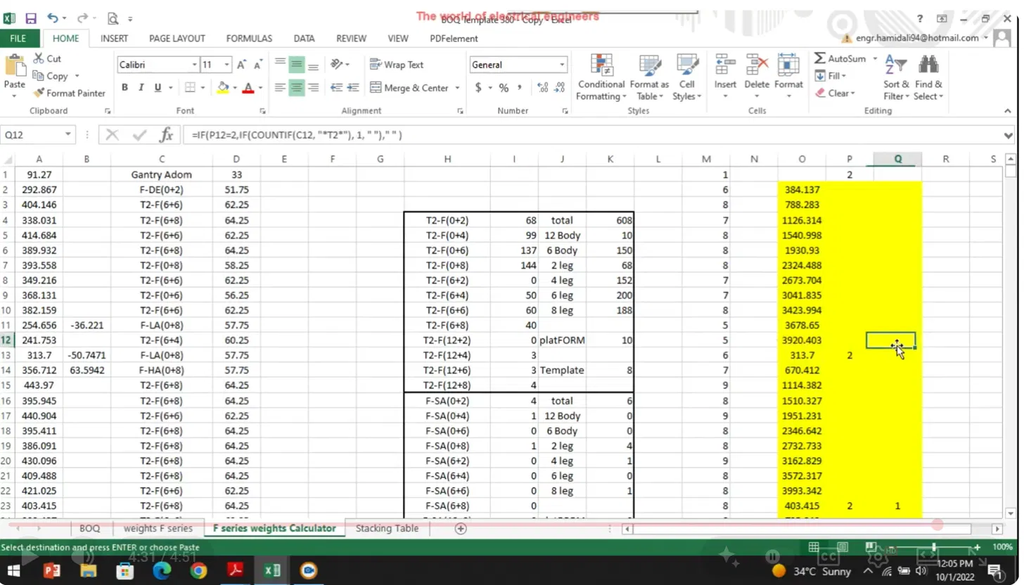
The template uses only four columns from the staking table:
- Span ahead
- Angle of deflection
- Tower type
- Tower height
Copy these four columns and paste them into the F series weights Calculator sheet. The template reads each tower type, such as T2-F(6+8), and works out which body extension and leg extension it uses.
What You Get
Tower counts and weights by type
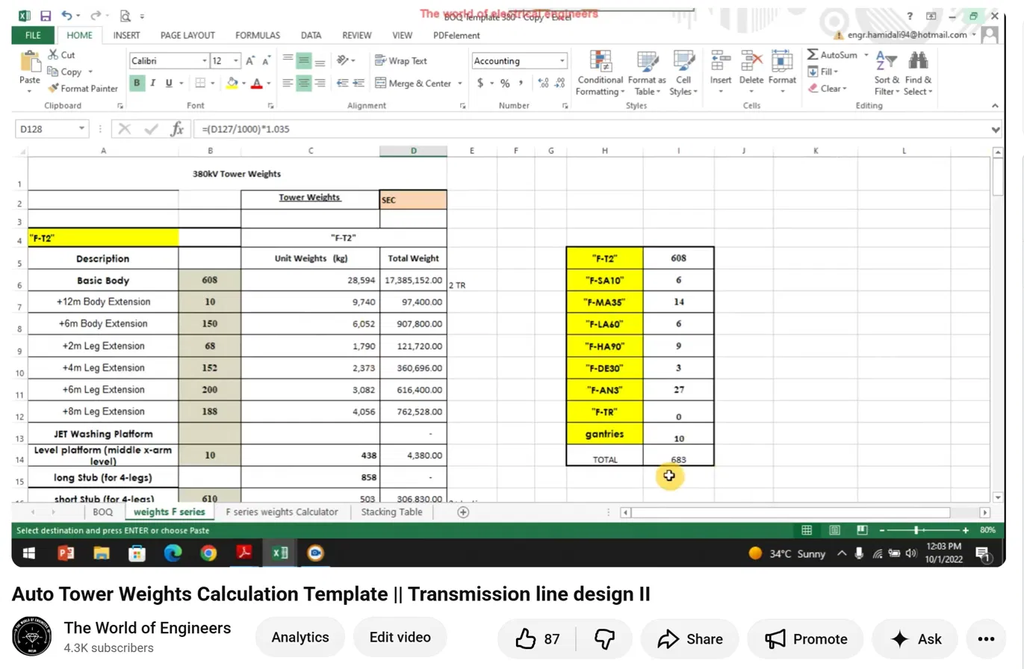
In our demo line there are 683 towers. The template splits them like this:
| Tower type | Quantity |
|---|---|
| F-T2 | 608 |
| F-SA10 | 6 |
| F-MA35 | 14 |
| F-LA60 | 6 |
| F-HA90 | 9 |
| F-DE30 | 3 |
| F-AN3 | 27 |
| Gantries | 10 |
| Total | 683 |
The weights sheet then multiplies the number of towers by the unit weight of the basic body. It does the same for every body extension (+6 m, +12 m) and leg extension (+2 m to +8 m), and adds the platforms and stubs.
Grand total weight
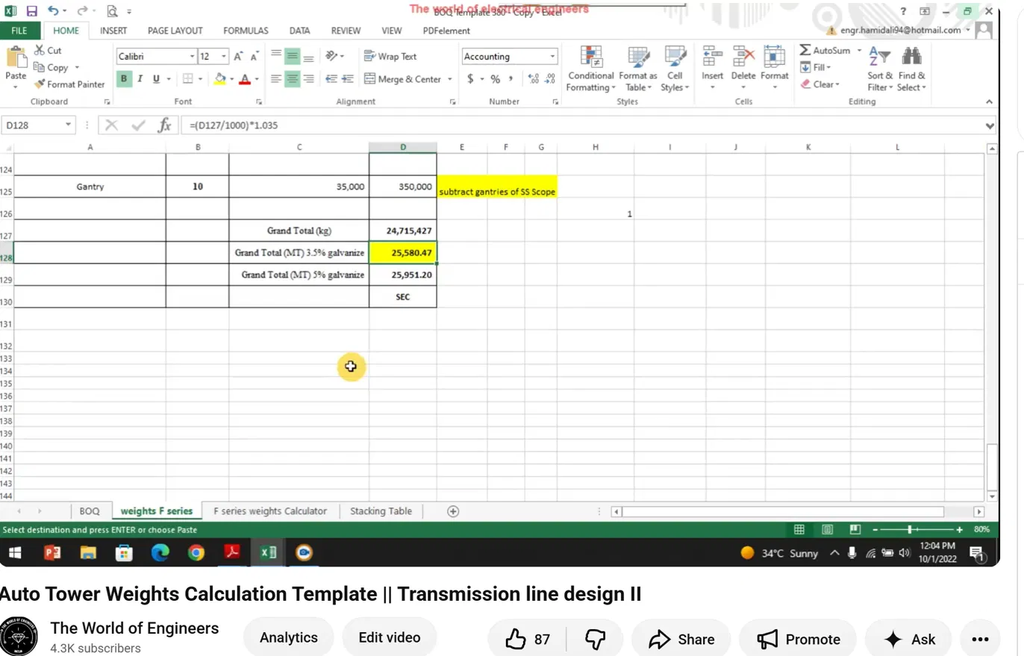
The template adds everything up and applies a galvanizing allowance. In this demo the grand total is about 24,715 tonnes before galvanizing. That becomes 25,580.47 MT at 3.5% galvanizing, or 25,951.20 MT at 5%. The sheet also reminds you to subtract any gantries that fall under the substation scope. These figures are only an example, because they are based on sample weights.
Quad spacer dampers and joint boxes
The template also gives you two quantities that are easy to miss in a manual take-off:
- Quad spacer dampers: 31,554
- Joint boxes: 138 (plus 60 JB on SS)
Important: Read Before Using the Template
Note on weights: The unit weights in this template are sample values. They are random and not correct for any real project. You must enter the correct weights from your own project.
Note on tower names: The template only calculates correctly if the tower names in your staking table are exactly the same as the names used in the template. If you want to change a name or add another tower type, you need to update the formulas and code accordingly.
Our recommendation: Don’t rely on the template blindly. It is better to understand the formulas it uses and then build your own Excel template. We explain every formula used in the video linked below.
How to Use It
- Open the template.
- Replace the sample unit weights with the correct weights from your project.
- Copy the four columns from your staking table.
- Paste them into the calculator sheet.
- Read the totals from the weights sheet and the BOQ sheet.
Work that used to take about half an hour can be done in around two minutes. In a tender with a tight deadline, that adds up.
Tips
- Replace the sample unit weights with the correct weights from your project before using any totals.
- Check that your column order matches the template before pasting.
- Make sure your tower type names exactly match the template’s naming, such as F-AN or T2-F(6+6).
- The first time you use the template on a new project, check the totals against a manual calculation.
Watch the Video and Get the Template
The full demonstration is on our YouTube channel, The World of Engineers. The template link is in the video description.
If you found this useful, subscribe to the channel and come back for more transmission line and substation content.